Öğrenci Yönetim Sistemi
A student record and grade tracking application. It takes a student number, name, e-mail, department, year of study plus midterm and final grades, adds the record to the list, calculates a 4.0-scale GPA from the weighted grades and stores every record so nothing is lost when the program closes.
- Year
- 2026
- Category
- Desktop App
- Tech stack
- Java · Swing · NetBeans · File I/O · OOP
Overview
I wrote this application while first learning the Swing library and the NetBeans design view in Java. Rather than trying out interface components in isolation, I wanted to connect them to something that actually works; keeping a list of students was both familiar and a good base to build logic on.
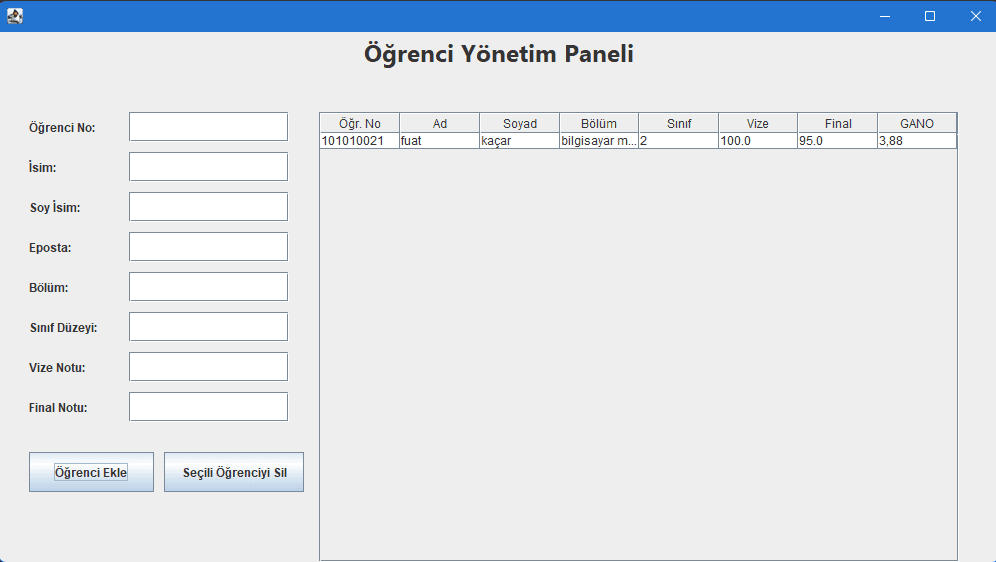
The form on the left takes a student number, first and last name, e-mail, department, year of study, midterm and final grade. Saved students are listed live in the table on the right, where a row can be selected and deleted. The midterm counts for 40% and the final for 60%, and the resulting 4.0-scale GPA is calculated automatically and written into the table.
To make records persistent I store the data line by line in a text file (ogrenciler.txt). The file is read every time the program starts and the table is refilled from it, so nothing is lost between sessions. This was the first time I used file reading and writing in a real program.
I split the code into three layers: the Ogrenci class is the model holding student data and the GPA calculation, the Yonetim class is the business logic handling add, delete, search and file operations, and the Ekran class is the interface layer designed with the NetBeans GUI Builder. Thanks to this separation, changing the interface does not mean touching the calculation logic — that turned out to be the most lasting thing I took from the project.
Highlights
- 01Adding students, deleting a selected row and listing records live
- 02Automatic 4.0-scale GPA from a 40% midterm / 60% final weighting
- 03Records persisted to a text file and reloaded automatically on start-up
- 04Class structure split into model, business logic and interface layers
- 05Swing interface designed with the NetBeans GUI Builder